LearnShare Product Roadmap
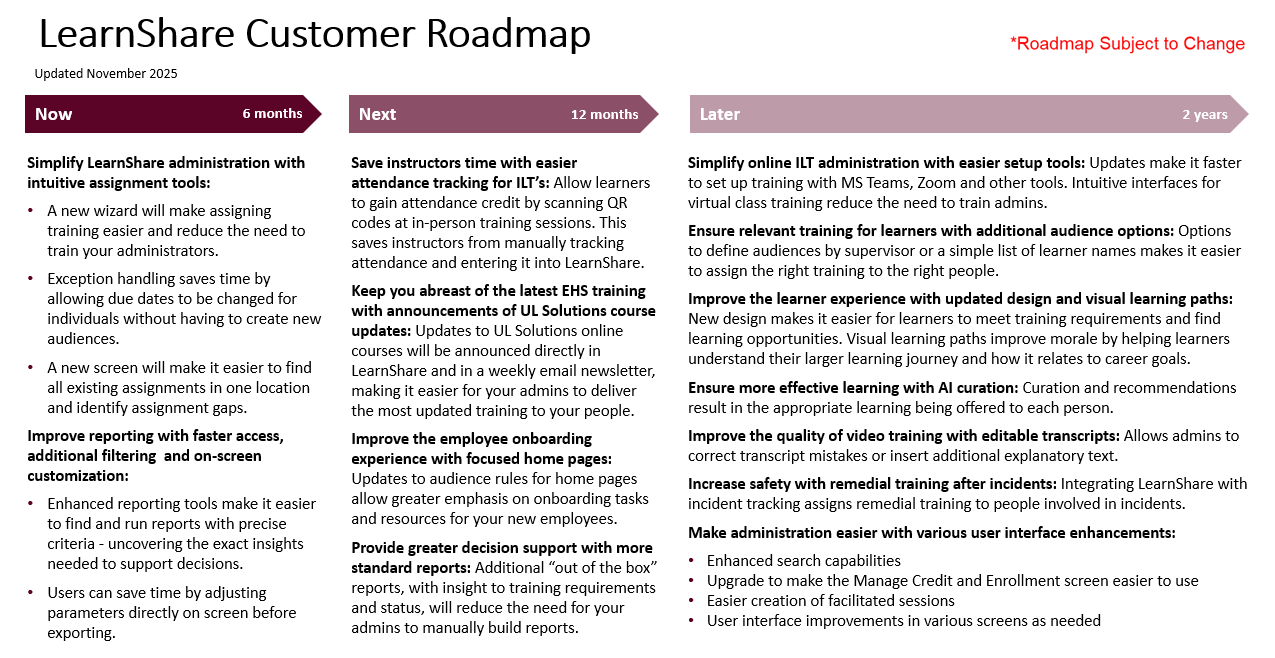
The following is a near-term roadmap that highlights recent releases and shows new features, capabilities, and enhancements that we are planning to introduce to LearnShare. Please note the following:
- The LearnShare product roadmap continues to evolve based on client needs and feedback. Please note this is subject to change.
- We want to hear from you! Feedback from our clients could result in us changing the priority of items on our roadmap. For example, moving one item ahead of another, moving an item that is currently de-prioritized onto our roadmap or making other changes. There are many ways for you to share your feedback, including participating in our periodic meetings with the LearnShare Client Feedback Group. If you don't currently participate in these meetings, but would like to, please contact Derek Viglianti at derek.viglianti@ul.com.
- Whenever this roadmap is updated, there will be a LearnShare system announcement to let you know.
LearnShare Product Roadmap - Recently Delivered
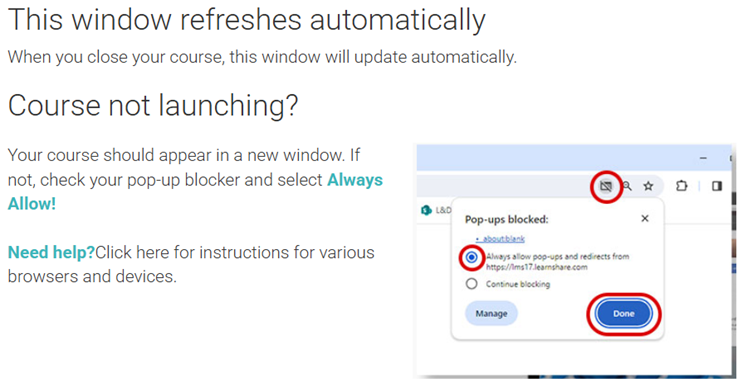
New Learner Warning for Popup Blockers
- Updated warning message to learners when they launch training in LearnShare
- Include links to instructions on how to block popups in various browsers and devices
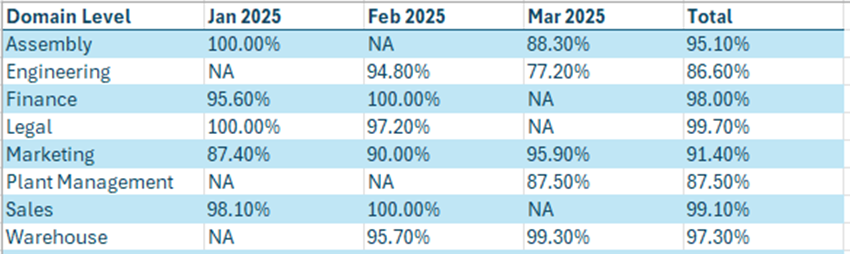
New Reports for PureSafety Powered by LearnShare
- People Assignments Report - For each person, summarizes required training status and recent completions
- Completion Status Report - For each month, summarizes percentage of training due that is complete
Faster OSHA Card Shipping
- OSHA cards now typically arrive within two to three weeks of training completion.
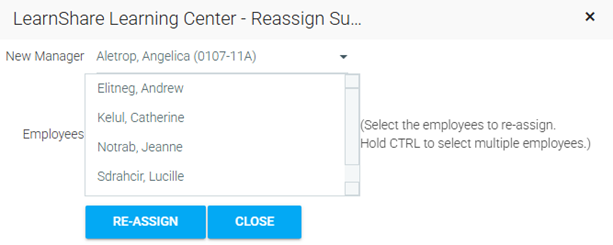
Easier Reassignment of Subordinates
- Saves administrators time when several users need to move from one supervisor to another.
- Instead of editing one user at a time, select multiple users and assign to new supervisor in one step.
Certificate Preview
- Easier view of certificate child structure
- Easier preview of child course content
- Link directly from certificate to child course in edit mode in Maintain Learning Resources screen

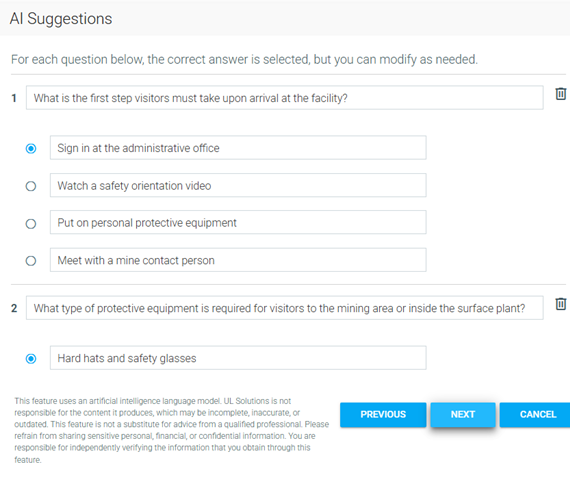
New Course Creation Wizard with AI Assistance
- Updated course creation wizard that supports SCORM, AICC, xAPI, Video, PowerPoint, and Read-and-Sign
- Automated recommendations of course title, description, course duration, and quiz questions based on AI analysis of course content
- Option to automatically create quiz and combine with course into a single assignable certificate. This ensures that learners not only need to complete the training but also pass a quiz to demonstrate what they learned.
LearnShare Product Roadmap - 6 Months
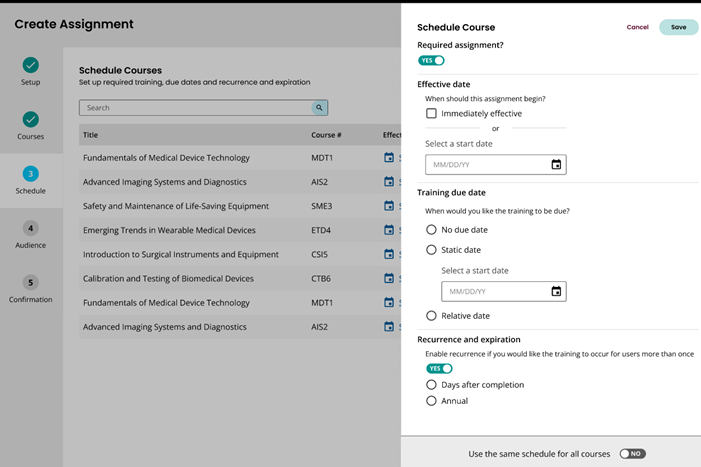
Simplify Administration with New Assignment Wizard
- For assigning training, a simple, step-by-step wizard will provide a faster, more intuitive method than the current process of creating mapping curricula.
- Wizard will use more intuitive terminology
- Will eventually become the standard method of assigning training everywhere in LearnShare in order to ensure a consistent experience
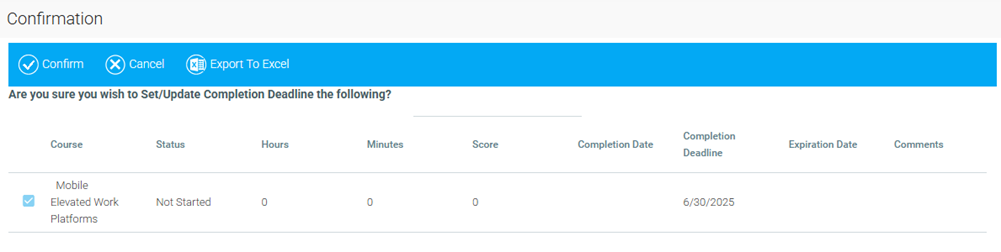
Easier Exception Handling of Due Dates for Learners in Required Audiences
- In the Manage Credit and Enrollment screen, you will be able to change the due date for a specific enrollment for a learner in a required audience.
- There will no longer be any need to create a separate audience just for learners who need their due dates changed.
New Screen to Make it Easier to Find and Manage Existing Assignments
- A single screen will provide visibility to all existing assignments, with multiple filters available to narrow down your view. This will make it easier to find the assignments you're looking for or identify gaps in training assignments.
- This screen will be available, filtered to assignments only for a specific course, while viewing that course in Maintain Learning Resources.
- Filtered lists of assignments will be exportable to Excel for reference outside of LearnShare or sharing with others.
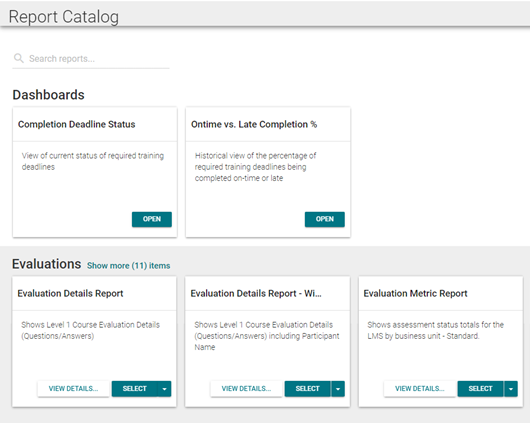
Improved Reporting with Faster Access, Additional Filtering, and On-Screen Customization
- Improved interface for report runners makes it easier to find the right report.
- Greater flexibility in applying filters and report criteria to find exactly the insights you need to support decisions.
- Run reports directly on screen and make adjustments before exporting to Excel, PDF, or other formats.
LearnShare Product Roadmap - 12 Months
Save Instructors Time with Easier Attendance Tracking for Instructor-Led Training
- Instructors will be able to easily generate and print QR codes for live training sessions. Learners attending the sessions will scan the QR codes to receive attendance credit.
- This will save instructors time having to manually track attendance and enter it into LearnShare later.
Keep You Abreast of the Latest EHS Training with Announcements of UL Solutions Course Updates
- Announcing updates to UL-licensed courses directly in LearnShare will eliminate the need to visit an external site to find out about course updates.
- Announcements will be limited to those courses that your organization licenses, thus reducing the clutter and making it easier to find what is relevant.
- Staying notified allows your administrators to continue delivering the most updated training to your people.
Improve the Employee Onboarding Experience with Focused Home Pages
- This will improve the new employee experience by increasing emphasis on onboarding tasks and new employee resources.
- This will be achieved by allowing advanced audience rules for portal pages.
- New employees can be presented with an onboarding version of the home page until a certain amount of time after hire date or until onboarding tasks are completed.
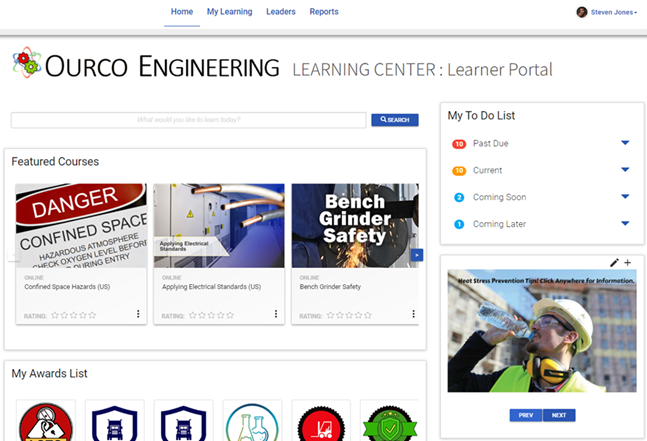
Provide Greater Decision Support with More Standard Reports
Adding more standard reports that are available "out of the box" will give you greater insight to training requirements and status without having to manually create ad hoc reports. This will include:
- New matrix reports for tracking learning status
- New report to show existing audience rules
- Reports with greater detail on certificates
LearnShare Product Roadmap - 2 Years
Simplify Online Instructor-Led Training Administration with Easier Setup Tools
- Dedicated integrations for MS Teams, Zoom, and other tools
- Ability to set launch links for specific facilitated sessions
- More robust attendance tracking and reporting options, including integration with conference tool APIs
- Meeting links in calendar events
- Streamlined administration
- Create links and sessions directly in the conference tool
Ensure Relevant Training for Learners with Additional Audience Options
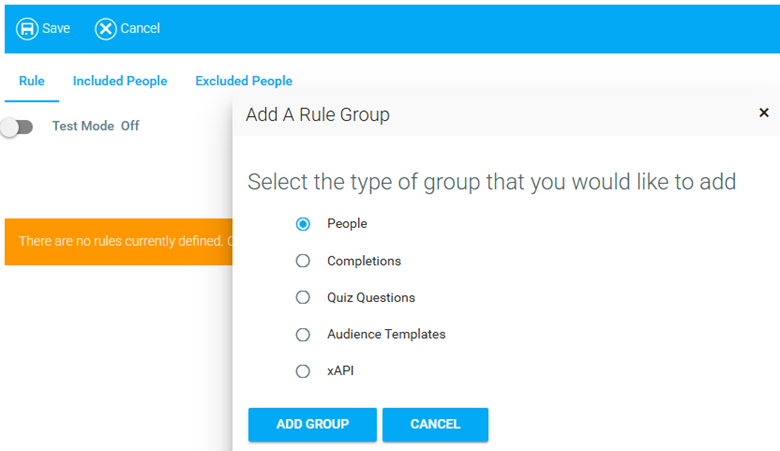
- New audience options, such as people who report to a specific supervisor and simple lists of users, will make it easier to target relevant training to the right people.
- Updates to the user interface will make it easier to create audiences, thus reducing the need to train your administrators.
Improve the Learner Experience with Updated Design
Upgrading the learner interface will not only create a more cosmetically appealing user experience, but it will also make it easier for learners to meet their training requirements and find learning opportunities. This will include:
- Upgraded To Do Widget
- Improvements to the following interfaces:
- Learning Plan
- Display Resource Screen
- History Screen
- Course Catalog
- Quiz Player
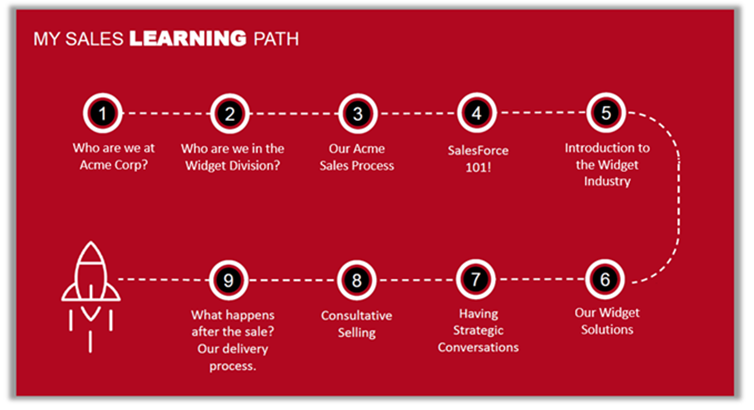
Improve the Learner Experience with Visual Learning Paths
Visual learning paths will improve the morale of learners by helping them see beyond a list of current assignments and understand their overall learning journey, their progress on that journey, and how it relates to their career goals.
Ensure More Effective Learning with AI Curation
Recommend learning content based on interests, job role and other person data, training history, and competency scores.
Improve the Quality of Video Training with Editable Transcripts
LearnShare automatically generates transcripts and translated closed captions when you upload videos to be used for training. This is useful not only for hearing impaired learners, but also to help learners find and navigate to specific content within long videos. This update will allow you to edit the transcripts to ensure the highest quality and most complete content for your learners.
Increase Safety with Remedial Training after Incidents
Expand UL Solutions incident management solution with the ability to assign remedial training as a follow-up to adverse or potentially adverse incidents. This helps reinforce safety concepts and mitigate the risk of future incidents.
Make Administration Easier
Administration tasks in LearnShare will be made easier and less time-consuming with the following enhancements:
- Enhanced search capabilities
- Upgrade to make the Manage Credit and Enrollment screen easier to use
- Easier creation of facilitated sessions
- User interface improvements in various screens as needed